How to Prepare Your Cross Using Reduct
August 2026
·
3 min read

As a public defender, I spent more nights than I can count trying to piece together questions and sources for a cross from three different places at once. I'd have bodycam footage playing in one tab, a hearing transcript buried in a folder, audio recordings lost somewhere in downloads, and a half-written Google doc glaring at me from another screen.
You know a contradiction is in there. You can feel it in your gut. But when you're staring down a trial date, finding it feels like searching for a needle in a digital avalanche.
I've been a fan of the way Reduct handles audio and video discovery. Making hours of footage actually searchable and manageable has been a breath of fresh air. But as any trial lawyer knows, discovery doesn't stop at video. There are police reports. Medical records. Witness statements. The paper trail accumulates just as fast as the footage does, leaving half your case trapped in static PDFs.
That's the gap I always wanted Reduct to bridge. And I'm genuinely excited to share, it just did! With document support officially live in Reduct, the platform transformed from a specialized multimedia viewer into a unified, single source of truth for the entire case.
I've been rebuilding the exact workflows I used when prepping for cross-examination. Here's what's been working for me:
1. Dump everything into Reduct
I used to have this itch to open files directly from my computer as they came in. A new police report lands. I'd just open it, read through it, make mental notes, and jot something sporadically in my notebook.
Now I dump everything into Reduct first, and I open files from within the platform.
I know that sounds like an added step. But even the very first time I read a police report, I can annotate, make connections, highlight, and label things as I read.
That's so much more powerful than keeping notes in my head or reaching for my handwritten notebook. By the time I'm done reading for the first time, the work has already started.
2. Label with a consistent system
When I go through discovery, I label the complainant's statements right then. I label all the discovery files: body-cam footage, jail call audio, hearing transcript, and police report. Anything where they're on record saying something. I use a single consistent label: [name] statement.
For instance, Officer Smith Statements.
I also use a color system based on importance. Yellow for anything I need to come back to. Red for something that needs more attention when I'm actually prepping the cross.
The key is not to wait until you're sitting down to draft.
Insider tip: If you're working with a larger defense team, make sure you all agree on shared label names and colors. This makes it much easier for everyone to contribute and stay on the same page.
3. See everything in a single view
Once things are labeled, every clip, transcript, quote, and document excerpt tagged "Officer Smith statement" show up in one view. I don't have to switch between tools and different tabs to verify things.
I can just go to the labels page and scroll down the list to see all my labels. Clicking on each label brings up the exact part of the video, audio, or documents.
And having everything in a single view helps me see inconsistencies, patterns, and recognize things that would have normally taken more hours to find.
4. Write down your questions along with supporting material
This is the part I don't actually use Reduct for. I prepare my chapters in a Google doc, with the Reduct tab open next to it.
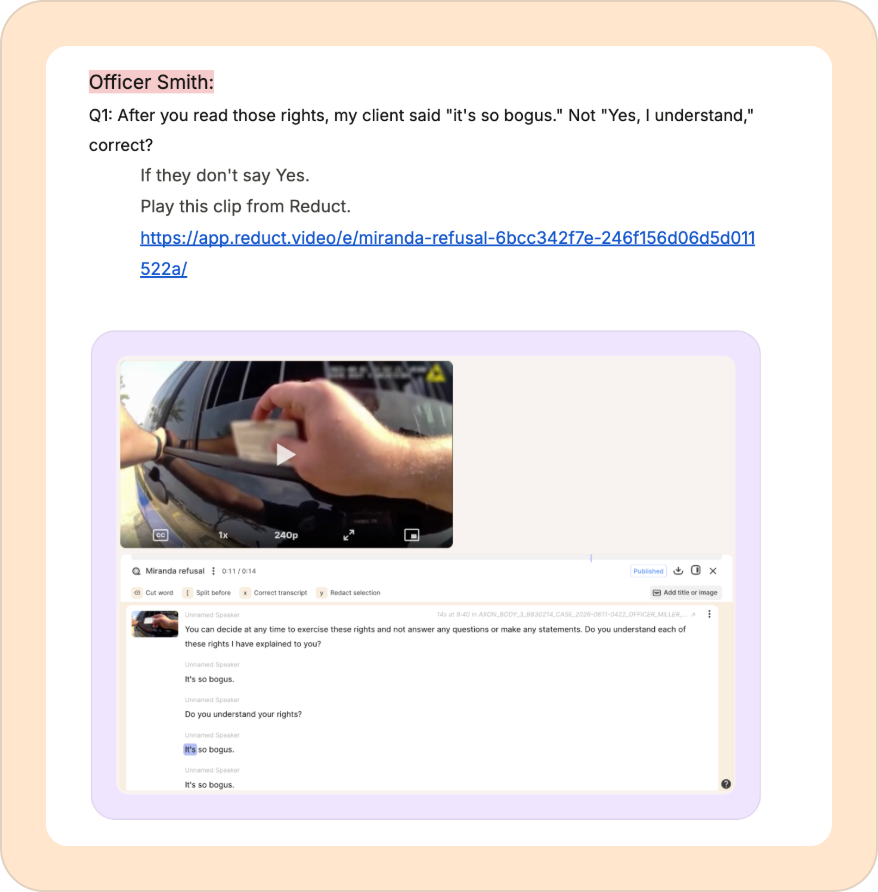
For every question in the cross, I include a link to the clip (if it's a video) or the page number and screenshots for reports, so I can pull it up instantly if I need to go back.
And when I don't have enough, I go back to the discovery. I can summarize, ask questions, re-read, and re-watch to find something I missed the first time.

With documents, Reduct has become so much more powerful and I really want all of my colleagues to see it for themselves. The best way to get started is to book a call with me. I'll walk you through the exact labeling system I've set up, and you can use it on a real case for free, in a secure cloud environment.
Or just book a call to say hi. I love learning how other defenders do things. So if you've got something interesting to share, let's jump on a call.
TALK TO A PUBLIC DEFENDER
We're on your team
We believe the people building tools for defenders should understand what it actually takes to be one. So we have former public defenders helping us build the product. Have a question about whether Reduct fits your office? We’d love to talk to you.